
The SketchUp Artist Bundle combines Artisan 2, Bevel, and SketchPlus into one official modeling package. Together, these three extensions cover organic modeling, subdivision, sculpting, terrain design, edge rounding, non-destructive bevels, component management, selection, architectural tools, and everyday SketchUp productivity.
The bundle is designed for SketchUp users who need more than a collection of unrelated single-purpose tools. Artisan 2 handles complex organic forms, Bevel refines sharp model edges, and SketchPlus accelerates many repetitive operations that appear throughout a professional modeling workflow.
This guide explains what is included, how the three extensions complement each other, their license differences, software requirements, practical applications, possible limitations, and whether purchasing the bundle offers better value than buying the plugins separately.
SketchUp Artist Bundle at a Glance
What Is the SketchUp Artist Bundle?
The Artist Bundle is an official licensing package containing three separate SketchUp extensions from the same developer. It is not one combined toolbar or a single merged plugin. Artisan 2, Bevel, and SketchPlus are installed and used as separate extensions, but their capabilities complement one another.
Artisan 2 focuses on organic subdivision, sculpting, soft transformations, quad-based modeling, and terrain. Bevel creates chamfers, fillets, and rounded edges. SketchPlus adds more than 40 productivity tools for selection, movement, components, buildings, drawing, camera control, materials, and tags.
Purchased separately, the licenses currently have a combined listed value of $178. The official bundle is currently listed at $133, producing a $45 saving compared with purchasing those specific license types individually.
Important License Difference
The three licenses in this bundle are not identical. Artisan 2 and SketchPlus are listed as subscription licenses, while Bevel is listed as a permanent license. Confirm the subscription period, renewal method, billing conditions, device allowance, and upgrade terms shown during checkout.
What Is Included in the Artist Bundle?
Artisan 2
A professional organic modeling toolset for subdivision, sculpting, quad-based editing, free-form transformations, and terrain grading.
- Real-time subdivision
- Quad-aware modeling
- Sculpting brushes
- Soft selection
- Auto-Add Detail
- Terrain Grade Brush
Bevel
A focused edge-rounding extension for creating fillets, chamfers, rounded corners, and editable Live Bevel effects.
- Chamfers and fillets
- Rounded model edges
- Non-destructive Live Bevel
- Auto-softening tools
- Edge cleanup
- Non-planar quad support
SketchPlus
A broad productivity extension containing more than 40 tools for common SketchUp modeling, selection, component, and organization tasks.
- Advanced selection
- Alignment and movement
- Component management
- Wall and roof tools
- Deep Stretch
- Camera, material, and tag tools
Bundle Pricing and License Structure
$178
Listed combined value$133
Current listed bundle price$45
Approximately 25%| Extension | License included | Separate listed value | Main purpose |
|---|---|---|---|
| Artisan 2 | Single-seat subscription | $99 | Organic subdivision, sculpting, quad modeling, and terrain |
| SketchPlus | Single-seat subscription | $30 | More than 40 productivity and workflow tools |
| Bevel | Permanent license | $49 | Fillets, chamfers, edge rounding, and Live Bevels |
| Artist Bundle | The three license types above | $133 bundle price | Combined artistic modeling and productivity workflow |
The 25% Saving Applies to Specific License Types
The comparison uses the subscription versions of Artisan 2 and SketchPlus together with the permanent Bevel license. It should not be compared directly with purchasing the lifetime version of SketchPlus or another license combination.
Artisan 2 Subdivision and Sculpting
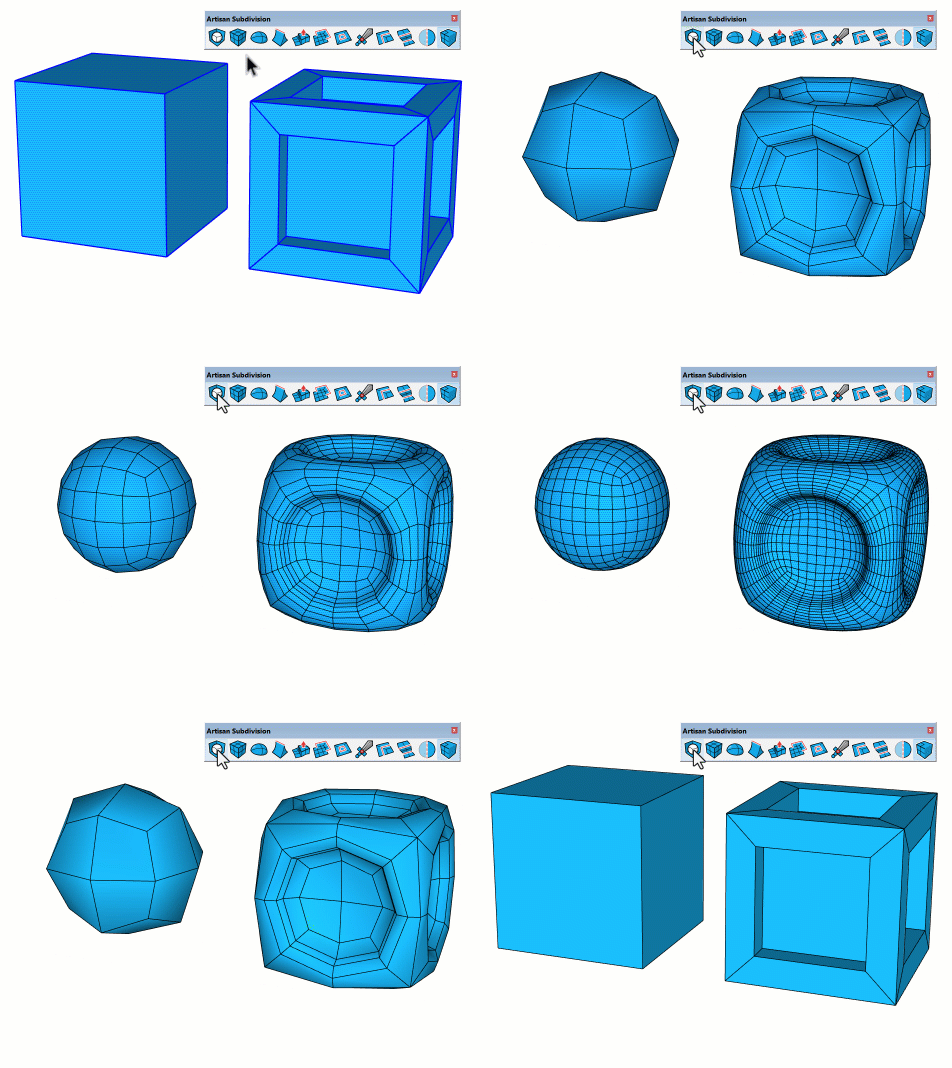
Artisan 2 extends SketchUp beyond standard hard-surface modeling. Users can begin with a relatively simple control mesh and subdivide it into a smoother organic surface while continuing to edit the underlying form.
Its quad-aware editing tools, sculpting brushes, soft transformations, free-form deformation, and terrain controls make it useful for furniture, cushions, characters, rocks, landscape forms, curved architecture, and conceptual geometry.
Bevel for Rounded and Realistic Edges
Perfectly sharp edges are uncommon in manufactured furniture, products, interior details, and architectural materials. Even a small chamfer or radius can produce more natural highlights and improve the realism of a render.
Bevel creates fillets, chamfers, and rounded corners without requiring users to construct every edge treatment manually with Follow Me, intersections, or additional profile geometry.

SketchPlus Productivity Tools
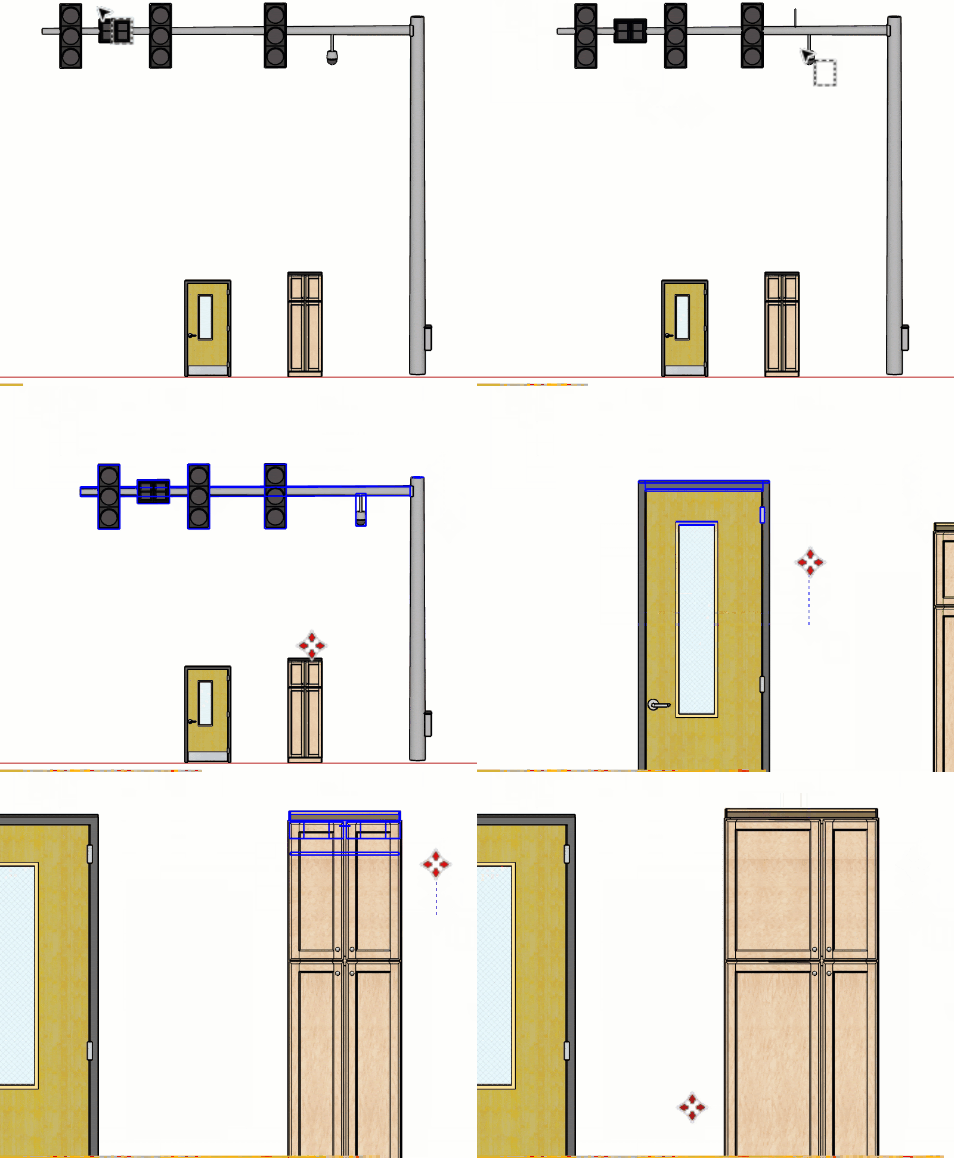
SketchPlus addresses many smaller operations that users repeat during daily modeling. Its toolsets cover selection, alignment, movement, components, architectural modeling, basic shape creation, camera controls, materials, and tag cleanup.
Current tools include Deep Stretch, Lasso Select, Selection Undo and Redo, Deep Select, Align, Nudge, Mirror+, Component Finder, Path Array, Wall, Hip Roof, Pipe, Walk+, Favorite Views, Deep Paint Faces, and recursive Untag commands.
How the Three Plugins Work Together
Furniture and Upholstery
Use SketchPlus to prepare, align, mirror, and manage components. Develop cushions, upholstery, and curved forms with Artisan 2. Finish hard edges and frame details with Bevel before rendering.
Organic Product Design
Create the primary organic silhouette using Artisan subdivision and sculpting. Add manufactured hard-surface parts using standard SketchUp and SketchPlus tools, then bevel exposed edges for more realistic results.
Landscape and Terrain
Grade and sculpt terrain using Artisan. Scatter, align, randomize, or manage repeated vegetation and components using SketchPlus. Apply Bevel to curbs, benches, planters, steps, and landscape furniture.
Architectural Visualization
SketchPlus accelerates wall, roof, component, material, and organization tasks. Bevel improves the realism of visible architectural edges, while Artisan can create curved façades, sculptural stairs, canopies, and organic design features.
Custom Interior Details
Use SketchPlus for selection, movement, component replacement, and repeated elements. Artisan can shape curved decorative features, while Bevel adds realistic radii to cabinetry, panels, furniture, and fixtures.
3D-Print and Presentation Models
Artisan can generate expressive forms, SketchPlus can simplify repetitive editing tasks, and Bevel can remove unrealistic sharp edges from objects intended for rendering or suitable solid-model preparation.
Why These Plugins Form a Useful Bundle
Each extension addresses a different modeling layer:
- SketchPlus handles workflow speed through selection, positioning, component, drawing, architecture, and organization tools.
- Artisan 2 handles form development through subdivision, sculpting, quad modeling, deformation, and terrain grading.
- Bevel handles edge refinement through fillets, chamfers, rounded corners, cleanup, and non-destructive Live Bevels.
Because the tools solve different problems, there is relatively little direct overlap. A typical workflow may begin with SketchPlus, continue with Artisan for complex shaping, and finish with Bevel before rendering or export.
Artist Bundle Compared with Buying Separately
| Consideration | Buying Separately | Artist Bundle |
|---|---|---|
| Initial price | The listed licenses total $178. | The official package is currently listed at $133. |
| License selection | Users can choose different individual license types where available. | Includes the specific subscription and permanent licenses defined by the bundle. |
| Best for | Users who need only one extension or want a different license combination. | Users who expect to use all three extensions. |
| Learning requirement | One extension can be learned at a time. | Three separate interfaces and workflows need to be learned. |
| Installation | Each purchased extension is installed separately. | The three extensions are still downloaded, installed, activated, and updated separately. |
| Subscription consideration | The user can select another license option where offered. | Artisan 2 and SketchPlus are included as subscription licenses. |
| Immediate saving | No bundle reduction. | The developer currently advertises a 25% saving. |
Software Compatibility
Artisan 2 currently requires SketchUp Pro Desktop 2018 or newer. Bevel and SketchPlus individually support SketchUp Pro Desktop 2017 or newer, but the minimum practical requirement for using the complete bundle is determined by Artisan 2.
Therefore, users should have SketchUp Pro Desktop 2018 or a newer supported desktop release to use all three extensions. These are desktop RBZ extensions and are not designed for SketchUp for Web or the iPad application.
At the time of review, the current versions were:
- Artisan: Version 2.1.2
- Bevel: Version 1.1.0
- SketchPlus: Version 1.3.0
Confirm Compatibility Before Ordering
Plugin compatibility can change after new SketchUp, Windows, or macOS releases. Verify the supported SketchUp versions and current download information for all three extensions before completing the purchase.
A Practical Learning Order
- Begin with SketchPlus. Learn the selection, movement, component, and alignment tools that can support almost every SketchUp project.
- Learn basic Bevel operations. Practice chamfers, fillets, edge selection, cleanup, and Auto-Soften on simple hard-surface objects.
- Understand subdivision fundamentals. Begin Artisan with low-polygon control meshes and simple quad-based forms.
- Introduce Artisan sculpting gradually. Test Grab, Smooth, Inflate, Flatten, Auto-Add Detail, and symmetry on small practice models.
- Combine the tools on one object. Model a chair, bench, lamp, planter, or decorative product using all three extensions.
- Create keyboard shortcuts carefully. Assign shortcuts only to frequently used commands to avoid conflicts and an unnecessarily complex workspace.
- Save before high-density operations. Create incremental model copies before subdivision, sculpting, recursive tools, or complex Live Bevel operations.
Performance and Modeling Tips
- Keep Artisan control meshes simple until the main proportions are correct.
- Avoid applying unnecessary subdivision levels to distant objects.
- Use Auto-Add Detail only where the sculpted surface requires more geometry.
- Apply Bevel only to edges that will affect the final silhouette or highlights.
- Test Live Bevel on duplicate components before applying it across a large model.
- Use SketchPlus tools by category instead of displaying every toolbar at once.
- Be careful with recursive Explode, Untag, material, and component operations.
- Optimize repeated components before copying them throughout a scene.
- Check face and edge counts before transferring models to rendering software.
- Use groups and components consistently to prevent loose geometry from merging.
- Purge unused components, materials, tags, and styles after testing.
- Save incremental versions before major organic or non-destructive edits.
Possible Limitations
The Artist Bundle contains three capable extensions, but purchasing them does not remove the need to learn subdivision topology, component organization, solid modeling, polygon management, and SketchUp's basic geometry rules.
Artisan can generate a large number of polygons through subdivision and sculpting. Bevel can also increase geometry when several segments are applied to many edges. Using both tools aggressively can produce a heavy SketchUp file.
SketchPlus includes more than 40 commands, and users may initially use only part of the toolset. Some features can also overlap with plugins already installed in an established SketchUp workflow.
The bundle license structure should be considered carefully. Bevel is listed as permanent, while Artisan 2 and SketchPlus are supplied as subscription licenses. The long-term cost therefore depends on the applicable renewal terms.
The advertised saving is valuable only when the user genuinely needs all three included products. Purchasing a bundle for one extension alone may cost more than buying that plugin separately.
A Bundle Does Not Guarantee Compatibility with Every Other Plugin
These three extensions come from the same developer and are designed to complement one another, but no plugin collection can guarantee the absence of conflicts with every third-party extension, toolbar, shortcut, rendering system, or future SketchUp update.
Who Should Buy the SketchUp Artist Bundle?
The bundle is particularly relevant to furniture designers, product designers, interior designers, landscape architects, visualization artists, organic modelers, advanced SketchUp users, and architects who create custom curved or sculptural elements.
It offers strong value when the workflow regularly includes:
- Organic or curved furniture
- Cushions and upholstery
- Sculptural architecture
- Terrain and landscape forms
- Custom product models
- Rounded edges for close-up rendering
- Complex component management
- Repeated selection and positioning tasks
- Walls, roofs, pipes, and architectural utilities
Users who create mainly simple rectangular massing, basic floor plans, or low-detail background models may not use Artisan or Bevel frequently enough to justify the complete package.
Users who already own one or two of the included extensions should compare their existing licenses with the bundle before ordering. The checkout may not automatically account for previously purchased products.
Is the SketchUp Artist Bundle Worth Buying?
Our Assessment
The SketchUp Artist Bundle offers a well-balanced combination of productivity, form creation, and edge refinement. Rather than including three plugins that perform nearly the same task, it covers three different stages of a modeling workflow.
SketchPlus helps users work faster, Artisan 2 expands the types of forms that can be created, and Bevel improves the final geometric detail and rendered appearance.
At the current listed price, the bundle saves approximately $45 compared with buying the included license types separately. It offers the strongest value to users who expect to use all three tools during the first year.
The main consideration is licensing: Artisan 2 and SketchPlus are subscription products in this bundle, while Bevel is permanent. Users should evaluate both the immediate discount and the long-term renewal terms before ordering.
Each plugin currently offers an individual trial. Testing the extensions with representative furniture, terrain, architectural, or product models is the most reliable way to determine whether the bundle suits the intended workflow.
Detailed Plugin Guides
Related SketchUp Resources
Frequently Asked Questions
What is included in the SketchUp Artist Bundle?
The bundle includes Artisan 2 for organic modeling and sculpting, Bevel for fillets, chamfers, and rounded edges, and SketchPlus for more than 40 productivity tools.
What is the current Artist Bundle price?
At the time of review, the official bundle was listed at $133 USD compared with a combined separate-license value of $178 USD.
How much does the Artist Bundle save?
The developer currently advertises a 25% saving, equal to approximately $45 compared with buying the included license types separately.
Are all three licenses permanent?
No. The official bundle currently lists Artisan 2 and SketchPlus as subscription licenses and Bevel as a permanent license.
Which SketchUp version is required?
The full bundle effectively requires SketchUp Pro Desktop 2018 or newer because Artisan 2 has the highest minimum-version requirement among the three included extensions.
Does the Artist Bundle work on Windows and macOS?
Yes. Artisan 2, Bevel, and SketchPlus are currently available for supported SketchUp desktop versions on both Windows and macOS.
Is the bundle one combined SketchUp plugin?
No. It is a licensing package containing three separate extensions. Each plugin has its own tools, interface, installation, activation, documentation, and update process.
Can the plugins be purchased separately?
Yes. Artisan 2, Bevel, and SketchPlus can each be purchased separately with the license options offered on their respective product pages.
Can I test the plugins before buying the bundle?
At the time of review, each of the three products offered an individual fully functional 15-day trial. Verify current trial availability and conditions before installation.
Is the Artist Bundle suitable for beginners?
SketchPlus and basic Bevel tools are approachable for newer users. Artisan's subdivision, quad topology, and sculpting workflows require more practice. Beginners should learn the tools gradually rather than attempting to use every feature immediately.
Who benefits most from this plugin bundle?
The bundle is best suited to furniture designers, product designers, visualization artists, landscape designers, interior designers, organic modelers, and advanced SketchUp users who need both artistic modeling and general productivity tools.
Will these plugins make SketchUp models heavier?
Artisan subdivision, sculpting, and multi-segment bevels can increase polygon counts. Users should apply detail according to the final camera distance and optimize models before creating many copies.